

Nationwide Office Relocation IT Moves | TechDispatch360
DISPATCH ONLINE · NATIONWIDE
24/7 TELECOM & IT EMERGENCY SUPPORT | 770-441-9999 | RAPID NATIONWIDE FIBER · VOIP · NETWORK DISPATCH | EMERGENCY PAGE →
DataTel 360 dba TechDispatch360 — decades of structured cabling, fiber, VoIP, smart hands, and nationwide field deployment experience. TRUSTED SINCE 1998
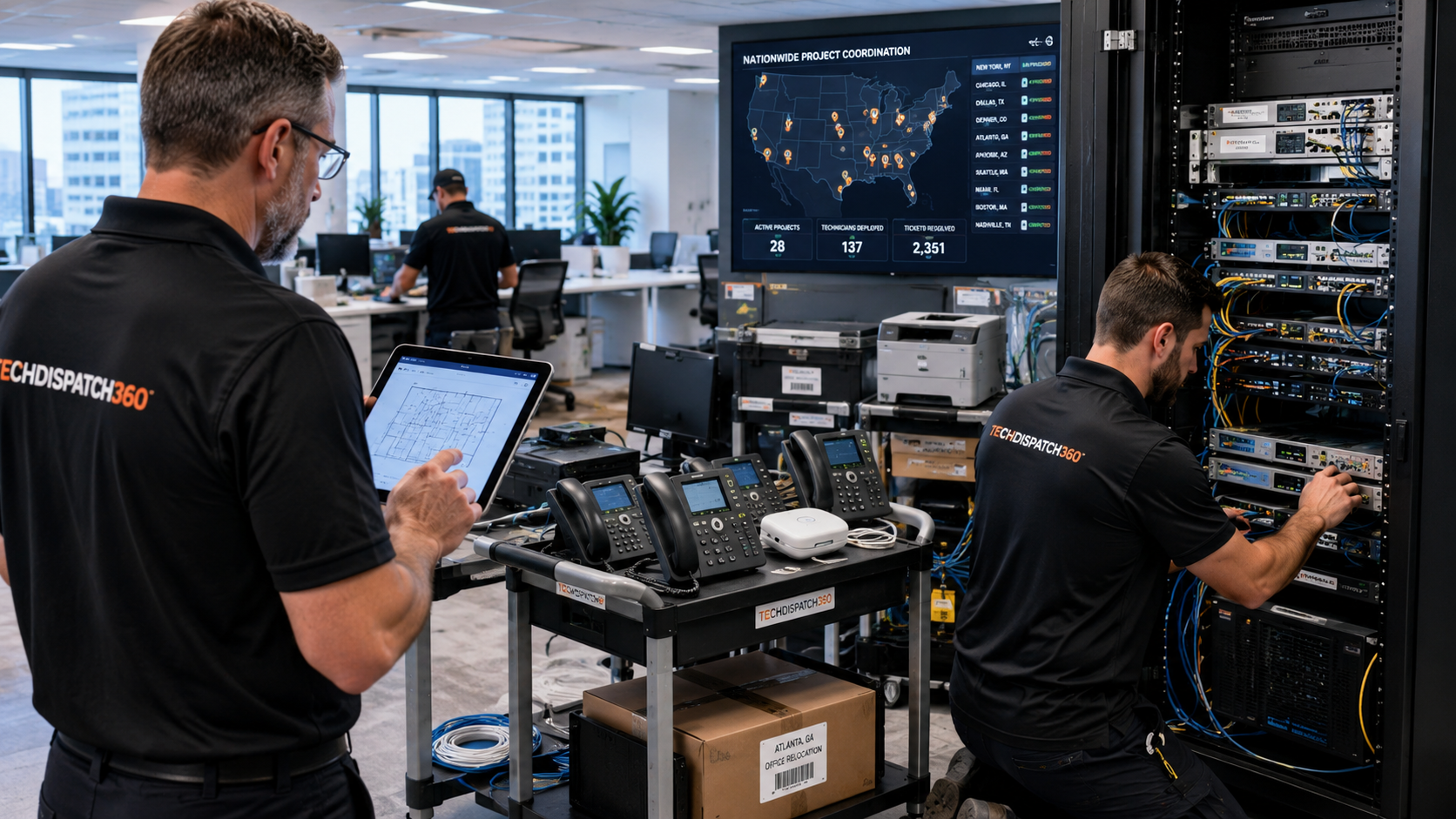
TechDispatch360 nationwide office relocation IT moves and enterprise technology relocation services
NATIONWIDE · OFFICE · BRANCH · RETAIL · ENTERPRISE · NO SINGLE-FAMILY RESIDENTIAL

Nationwide Office Relocation IT Moves & Technology Relocation Services

TechDispatch360 coordinates certified field technicians for office relocations, branch moves, technology cutovers, network cabling, VoIP phone migrations, Wi-Fi deployments, rack relocations, MDF and IDF buildouts, and Smart Hands support throughout the United States.

  • Nationwide IT Move Coordination
  • Office, Branch & Retail Relocations
  • Network Cabling, Fiber & Wi-Fi Support
  • VoIP Phone System Relocations
  • Weekend & After-Hours Technology Cutovers
  • Smart Hands & Remote Hands Services
27+ Years Commercial Field Experience Nationwide Field Dispatch · All 50 States 24/7/365 Live Dispatch Operations SMB → Fortune 500 · MSP & Carrier Friendly
Enterprise office relocation and nationwide technology move support by TechDispatch360 field technicians
1000+ Sites SupportedOffice, branch & retail moves
Nationwide CoverageAll 50 states
24/7/365 DispatchAvailable around the clock
Enterprise & Multi-SiteProjects of every scale
Office Technology Relocation Services

Complete IT Move Support For Business Relocations

Moving a business is a technology project before it is a furniture project. TechDispatch360 delivers end-to-end IT office move support — disconnecting, relocating, reinstalling, and verifying the infrastructure that keeps your operation running, wherever your new site is located.

We coordinate every category of commercial relocation nationwide: corporate headquarters moves, branch office relocations, retail store technology relocations, distribution center moves, warehouse technology migrations, office consolidations, facility expansions, and multi-site relocation projects. Whether you are moving a single floor or running a national rollout across dozens of locations, the work is dispatched through one operations team so nothing falls between the cracks on move day.

The defining principle of any successful technology relocation is simple: technology equipment requires trained technicians — not movers. Furniture crews are excellent at moving desks and boxes, but networks, phones, and server-room equipment need people who understand how the systems connect. A dropped switch, a mislabeled patch panel, or an unverified circuit can take a brand-new office offline on its first business day — the exact failure that proper business technology migration planning exists to prevent.

Our technicians work across every layer of your environment — networks, VoIP, Wi-Fi, fiber, MDF rooms, IDF rooms, firewalls, switches, and UPS systems. We document what leaves the old site, label what arrives at the new one, and test every connection before we sign off. This is IT infrastructure relocation done as a controlled project, not an afterthought bolted onto a furniture move. For the full menu of field disciplines we dispatch, see our services overview and our nationwide smart hands relocation services.

One coordinated move, one point of contact. From the first site survey to the final closeout report, TechDispatch360 manages the technicians, the schedule, and the escalation path — so your internal IT team can focus on the business, not on chasing vendors city by city.
Relocation Specialties

Enterprise Relocation Types

Every environment moves differently. We tailor the technology relocation plan to the uptime, compliance, and scheduling realities of each type of facility we serve.

Corporate Headquarters Relocations

Multi-floor and campus moves with phased cutovers that keep leadership and core systems online.

Branch Office Moves

Repeatable branch office technology relocation playbooks for banks, agencies, and regional teams.

Retail Store Technology Moves

POS, networking, Wi-Fi, and signage relocations scheduled around store hours and openings.

Warehouse & Distribution Center Relocations

Scanning, networking, and connectivity migrations for high-throughput logistics environments.

Healthcare Facility Relocations

Careful handling of clinical network, phone, and connectivity systems with documentation discipline.

Financial Institution Relocations

Branch and back-office moves with structured cutovers and full closeout documentation.

Data Center Equipment Moves

Rack relocations, structured de-install/re-install, and labeled, tested reconnection.

Multi-Site Rollouts & Expansions

One dispatch process and one escalation path across every location in your program.

Equipment We Handle

What We Disconnect, Move, Reinstall & Support

Every device that connects to your network is handled by a technician who understands it — disconnected, transport-prepped, reinstalled, and verified at the new site.

WorkstationsDesktops & docking stations
MonitorsSingle & multi-display
VoIP PhonesDesk handsets & softphones
Conference PhonesRoom & huddle audio
PrintersMFPs & network printers
Network SwitchesAccess & distribution
FirewallsSecurity appliances
RoutersEdge & gateway devices
UPS SystemsBattery backup units
Wi-Fi Access PointsMounting & coverage
Network RacksOpen frame & enclosed
Patch PanelsCopper & fiber
Fiber InfrastructureSingle & multimode
POS SystemsRegisters & terminals
Security CamerasIP & NVR systems
Digital SignageDisplays & players
If it plugs into your network, we can move it. Tell us what's on your relocation list when you request office move support.
Scope Of Work

Office Relocation Services

From the first walkthrough to day-one go-live, every stage of a technology relocation is covered. Engage the full project or just the office network move services your internal team needs hands for.

Pre-Move Site SurveysOld & new walkthroughs
Technology Asset InventoryDocumented & labeled
Disconnect & ReconnectCertified teardown/setup
Network Cabling InstallationCat5e / Cat6 / Cat6A
Fiber ExtensionsBackbone & uplinks
MDF BuildoutsMain distribution frame
IDF BuildoutsIntermediate closets
Rack & Stack ServicesMount, cable & dress
VoIP RelocationPhone & PBX moves
Wi-Fi DeploymentAP placement & tuning
Day-One SupportOn-site go-live coverage
Technology CutoversCoordinated switchover
Closeout DocumentationPhotos, tests & sign-off
Multi-Site Coverage

Built For Nationwide Multi-Site Relocations

Organizations that operate in many locations need a relocation partner that scales with them. TechDispatch360 was built to coordinate technology moves across multiple sites, multiple states, and multiple schedules — under one process.

We routinely support MSPs, enterprise IT departments, national retailers, healthcare organizations, hospitality groups, property management companies, logistics operators, and distribution networks. Whether you are an MSP white-labeling nationwide smart hands relocation services for a client, or an enterprise IT department consolidating regional offices, the engagement model is the same: you define the scope, and we dispatch qualified technicians to each site on schedule.

The advantage of a single national partner is coordination. Instead of vetting a different local vendor in every city — and hoping each one shows up prepared — you work through one team that already knows your standards, your equipment, and your escalation expectations. That consistency is what turns a risky multi-city program into a predictable network relocation services rollout. Learn more about how we deploy field technicians across the country on our nationwide smart hands page.

One Point Of ContactSingle coordinator
One Dispatch ProcessConsistent everywhere
One Escalation PathClear accountability
Nationwide CoverageAll 50 states
Risk & Planning

Why Technology Relocations Fail

Most office moves don't fail because the desks arrived late — they fail because the technology wasn't planned as its own project. These are the ten failure modes we plan against on every relocation, and the reasons experienced technology cutover support exists.

Internet Circuit Delays

Carrier installs ordered too late mean the new office opens with no connectivity. We help you sequence orders early and verify install dates against the move window.

Demarc Extension Problems

The circuit lands at the building demarc but never reaches your IDF. We coordinate demarc extensions so the handoff actually reaches your equipment.

Poor Documentation

Without a documented inventory and connection map, reassembly turns into guesswork. We document everything before it moves.

Missing Labels

Unlabeled cables and ports make a clean cutover impossible. Consistent labeling standards keep the new site serviceable for years.

Wi-Fi Coverage Failures

Access points relocated without a coverage plan leave dead zones. We place and tune APs for the new floor plan, not the old one.

VoIP Migration Issues

Phones that never come back online strand reception, sales, and support. Structured VoIP phone relocation keeps the lines live.

Switch Configuration Mistakes

Re-racked switches with the wrong uplinks or VLANs break the network silently. Technicians verify connectivity before sign-off.

Firewall Deployment Issues

A firewall reinstalled without verifying rules and routing can block the business or expose it. We confirm it passes traffic correctly.

No Onsite IT Support

When something breaks on day one and nobody is on site, downtime stretches for hours. Day-one go-live coverage closes that gap.

Insufficient Project Planning

A move with no scope review, survey, or schedule is a move that improvises on the day. Planning is the difference between a cutover and a crisis.

Planning a complex move? Talk through the risks with our team — request office move support or call 770-441-9999.
How It Works

Our Relocation Process

A predictable, documented sequence keeps every move on schedule — from the first scope call to the moment your new site goes live.

Step 1

Scope Review

We confirm equipment lists, timelines, site contacts, and the success criteria for go-live.

Step 2

Site Survey & Planning

Technicians assess both locations — power, cabling, MDF/IDF, and access — and build the move plan.

Step 3

Labeling & Documentation

Every cable, port, and device is labeled and photographed so reassembly is fast and accurate.

Step 4

Move Day Cutover

Disconnect, transport-prep, reinstall, and bring the new site online during your scheduled window.

Step 5

Testing & Closeout

We verify connectivity, phones, and Wi-Fi, then deliver a closeout package and site sign-off.

Minimal Downtime

After-Hours & Weekend Technology Cutovers

Business doesn't stop for a move. We schedule cutovers around your operation so staff arrive to a working office, not a cutover in progress.

Our technicians work nights, weekends, and holidays to complete relocations and technology cutovers outside business hours. The disruptive work — disconnecting circuits, re-racking equipment, swinging phones and internet to the new site — happens while your team is away, and the office is ready when they return.

A clean cutover depends on coordination with everyone who touches the connection. We work alongside your carriers, internet providers, landlords, building management, MSPs, and enterprise IT teams so circuit installs, demarc access, and building entry all line up with the move window. If something goes wrong mid-cutover, our 24/7/365 emergency technology support team is already engaged.

New Site Readiness

Network Cabling & New Office Readiness

A new office is only ready when the cabling is in, tested, and documented. We build and certify the physical network so your equipment has somewhere reliable to plug in on day one.

Our structured office cabling relocation services cover the full range of modern office and retail environments — Cat5e, Cat6, and Cat6A copper, plus single-mode and multimode fiber optic backbone. We terminate to patch panels, run dedicated AP cabling for wireless access points, wire conference rooms for video and audio, and extend the demarc where the carrier hands off to the building.

Every run is certified and tested, then labeled to consistent labeling standards so future moves and adds are simple. Rack buildouts are dressed and labeled to a professional standard, and we leave you with results you can hand to any technician who works the site later. For dedicated cabling and fiber projects, see fiber optic installation & repair and our full services list.

Cat5eCat6Cat6AFiber OpticPatch PanelsTestingCertificationAP CablingConference Room CablingDemarc ExtensionsRack BuildoutsLabeling Standards
Risk Reduction

Common Problems We Help Prevent

A documented, technician-led process catches the usual move-day failures before they become a first-morning outage.

Internet not ready on day one
Demarc not extended to the IDF
Phones offline after the move
Wi-Fi coverage issues
Missing documentation
Missing or inconsistent labels
Firewall problems
Switch problems
No go-live support on site
Carrier coordination delays
Who We Support

Industries We Support

Different industries move differently. We adapt the process to the compliance, uptime, and scheduling realities of each environment we serve.

HealthcareClinics & practices
RetailStore & chain rollouts
HospitalityHotels & venues
DistributionDCs & warehouses
ManufacturingPlant & office moves
Corporate OfficesHQ & multi-floor
Property ManagementMulti-tenant & mixed-use
Financial ServicesBranch & back-office
Data CentersRack & equipment moves
Serving SMB, multi-site, multi-family property, and enterprise clients. No single-family residential service.
Proof Of Work

Documentation & Project Closeout

Every relocation ends with a closeout package — so you know exactly what was done, what was tested, and where everything lives in the new site.

Before photos
After photos
Rack photos
Cable labels
Test results
Technician notes
Site sign-off
Escalation notes
Project summary

You cannot copy content of this page